.png)
CONCEPTUAL FF&E SYSTEM
Most interiors fail before the layout begins.
Because the references never become a coherent visual language.
SampleBoard Studio’s Conceptual FF&E Systems are curated visual foundations built around a single style direction.
Furniture, lighting, materials, textiles, decor, and art — organised into one cohesive system for faster concept development, clearer mood boards, and more aligned presentations.
Not inspiration boards.
A structured visual language for interior concepts.


Your references aren't the problem.
They're just not usable.
47 saved folders. Inconsistent imagery. Mixed styles. Copyright grey areas. Hours lost searching for a sofa that actually fits the direction.
The concept never fully forms — not because the taste isn't there, but because there's no foundation to build from.
The problem was never inspiration.
The problem was always the system to use it.
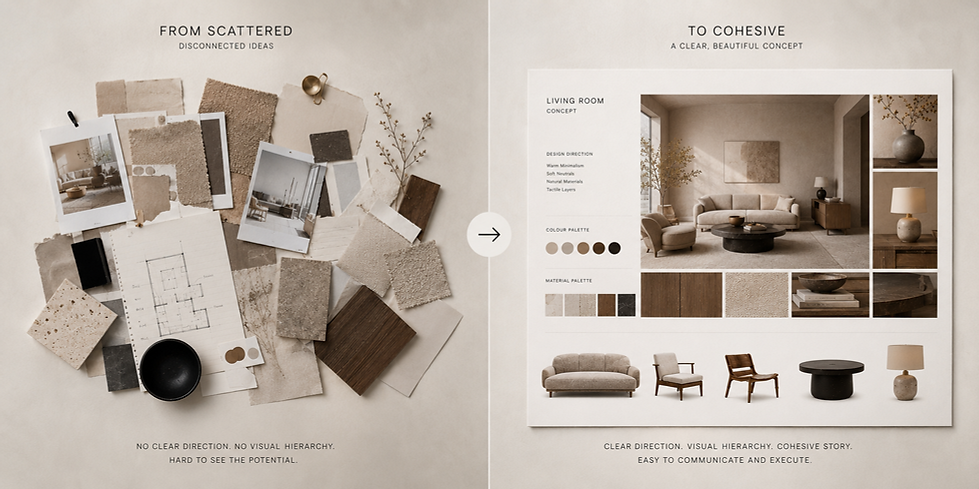
No More Searching.
Just Building.
Each Studio system includes a complete style-specific FF&E foundation — curated references organised into one cohesive visual language. Designed to reduce sourcing fatigue, strengthen concept clarity, and accelerate the design workflow from mood board to presentation.


THE FOUNDATION
What Is a
Conceptual FF&E System?
Each style inside Studio includes a complete visual FF&E foundation — curated specifically around one design language.
Furniture, lighting, materials, textiles, decor, and styling references are already aligned, organised, and ready to use across concept development, mood boards, and presentations.
Not a collection of disconnected assets.
A cohesive visual system built for interior designers.


Built by category.
Not by chance.
Every category is curated within the same design language — so the concept stays visually cohesive from the first mood board to the final presentation.
HOW IT CONNECTS
From Concept Foundation to Client Presentation
The Conceptual FF&E System forms the visual foundation of the wider Studio workflow — connecting style direction, concept development, mood boards, and presentation.
WHY STUDIO IS DIFFERENT