.png)
PREVIEW MODE - FULL ACCESS AVAILABLE INSIDE STUDIO MEMBERSHIP
Organic Modern
System Library.
A complete design system for Organic Modern — from style principles to presentation. Each step builds on the last. Work through them in order.
01
STEP 1 OF 6 - 15 MINUTES
Read the Style Guide first.
Before you open a template, understand the style. 15 minutes here saves hours of second-guessing later.
The Organic Modern Style Guide is your foundation. It covers the visual principles, material palette, spatial language, and design rules that define this style direction — so every decision you make in the next steps has context behind it.
Don't skim this. Read it properly. The designers who produce the strongest work in Studio are the ones who spent time here first.

02
STEP 2 OF 6 - 30 MINUTES
Build your first concept.
Open the Mood Board System in Canva. Select assets from the preview library and build your first composition. Don't wait until the assets are perfect — start building now.
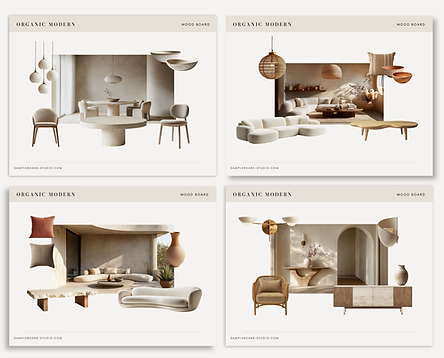
A starter set of assets is included inside the templates — explore and build before downloading the full library.
The Organic Modern Mood Board System includes four layout templates in Canva — each designed to work with the asset library. Open it directly in Canva and start building.
A starter set of assets is already loaded inside the templates.
You don't need to download anything to start. Just open, select, and compose.
Opens in Canva. Make a copy to edit.
03
STEP 3 OF 6 - 10 MINUTES
Access your Asset Library.
260+ curated assets for Organic Modern — all style-matched, all ready to upload directly to Canva. This replaces your sourcing process entirely.

Access the full library inside your Studio membership. Upload directly to Canva.
Every asset in this library was curated for Organic Modern specifically — not pulled from a general pack and relabelled.
The palette, material language, and silhouettes all speak the same style direction.
Once uploaded to Canva, return to your mood board from Step 02 and swap the starter assets for the full library. Your concept will immediately become more precise.
04
STEP 4 OF 6 - 45 MINUTES
Present your design.
Your concept is built. Now structure it into a presentation a client can follow. The template does the formatting — you bring the decisions.
The Organic Modern Presentation Template is a structured Canva deck designed to turn your mood board concept into a professional client narrative. It includes cover, concept overview, palette, material story, space-by-space pages, and a closing summary.
Take your work from Step 02 and Step 03 and move it into this template. Arrange your assets, add your annotations, and build the story behind your design decisions.
![Copy of Copy of [MASTER] SampleBoard — Style Showcase System (DO NOT EDIT) (1200 x 1600 px](https://static.wixstatic.com/media/0d867d_483554a3049e4be6a3fe9ced64a09f4f~mv2.png/v1/fill/w_497,h_621,al_c,q_85,usm_0.66_1.00_0.01,enc_avif,quality_auto/Copy%20of%20Copy%20of%20%5BMASTER%5D%20SampleBoard%20%E2%80%94%20Style%20Showcase%20System%20(DO%20NOT%20EDIT)%20(1200%20x%201600%20px.png)
05
STEP 5 OF 6 - 5 MINUTES
Submit your work for feedback.
Your work will be reviewed and returned with notes. Use the feedback to make decisions better on the next style.
Get feedback on your work and use it freely. Submit your finished mood board or presentation below — it will be reviewed and returned with specific, actionable notes.
This is the most important step most designers skip. External feedback accelerates your development faster than any template or library can.
The best feedback loop is a simple one: build something, share it, get notes, apply them. Repeat this across six styles and your design instincts will compound.
Your work is shared only with the Studio review team. It will not be published or shared publicly without your permission.
You've completed the
Organic Modern workflow.
You've read the style guide, built a concept, used the asset library, structured a presentation, and submitted your work for feedback.
That's a complete design project. Not a mood board. A system.
Next Style Drop: Juniper
Japandi.
A new style direction. A new library. A new concept to build.
The Japandi drop follows the same six-step workflow — applied to a completely different visual language.
SAMPLEBOARD STUDIO